The best accounting software for a small business: Sage Accounting Review

Sage Business Cloud Accounting
Product Name: Sage
Website: Sage.com
Owners: British multinational enterprise software company
Price: Sage pricing differs depending on which country you are in. For the purpose of this review, I am giving the pricing for the United States and South Africa.
United States pricing
- Entry-level – $10
- Full accounting – $25
- Full comprehensive accounting visit our pricing for a full list of options click here ===>>>Pricing
Overview and Sage Features
Sage is a global company that operates across 23 countries. Sage provides integrated accounting, payroll and payment systems. Sage provides life information to business owners and managers so that they can make decisions anytime anywhere, about every key business aspect from money to people. In this review, I am focusing on the accounting system and not on the Sage payroll system.
Sign up and login
It is very easy to login to your accounting software after you have signed up for Sage. All you need is an internet connection, username and password. Your login will give you access to your secured accounting records. Sage provides 256-bit encryption security.
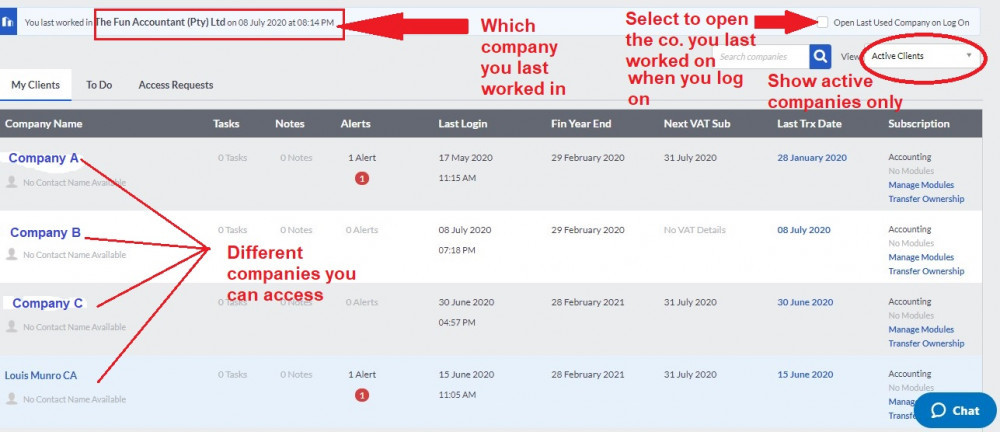
You can have access to multiple businesses with a single login username and password. This login provides you with various options
- Choose to company and which companies to view (active vs inactive)
- See which company you last worked on and when.
- You can choose to open the company you last worked on when logging on.
- Alerts for important aspects to deal with like overdue quotes.
- Tasks and notes that you need to attend to.
- The financial year-end you are working on and the next VAT/Tax submission date
- Subscription details and live chat for live support.
The Sage workspace & dashboard
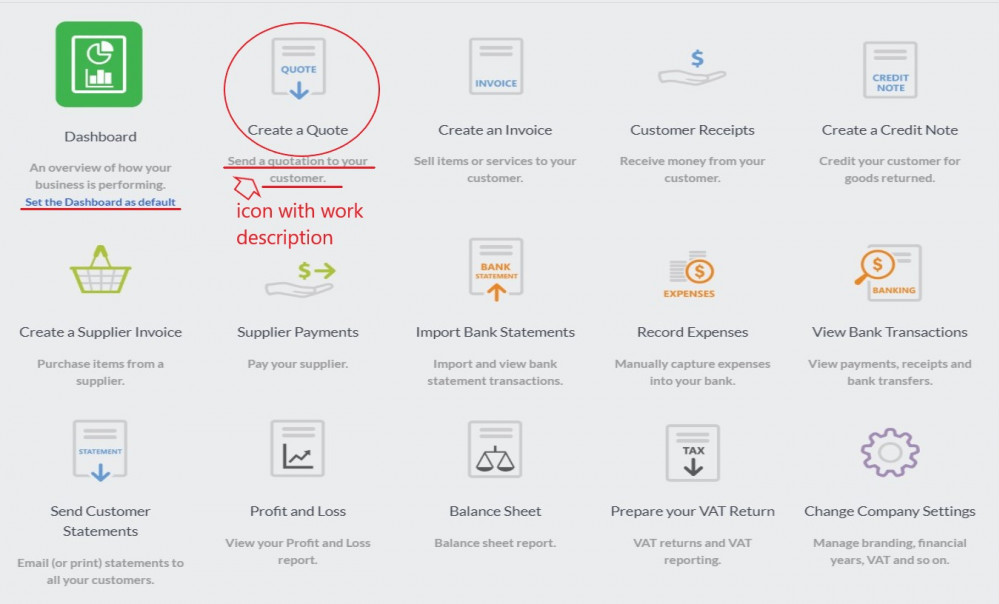
You are welcomed by a business workspace after you logged-in to Sage. The workspace is very helpful with icons and descriptions explaining what to do.
The dashboard can easily be customized based on your preferences to give you a snapshot of what you need the most for example:
- Customer widget e.g. top customers by sales
- Banking widget e.g. your current bank balances without having to log into your bank
- Quotes and sales widget e.g. sales history with drill-down functions by clicking on the graph
- Customer widget showing top customers by sales
- Item widget e.g. Top selling Items
- Supplier widget e.g. “Supplier balances – days outstanding”
- Other widget e.g. “to do list” and “profit and loss” report
Accountant’s Area
As a Sage subscriber, you automatically get an additional user which can be used to invite your accountant to your business’ books. Your accountant can then access your books and help with the tasks you can’t do or hate to do. Your accountant can also invite his own team of specialists to your books without you or the accountant having to pay for this additional feature. Sage ensures that the right people with specialized knowledge can assist you where needed.
Under this menu, there is a Note item that enables you to write a note to your accountant as a question or reminder. Your accountant is notified on his Sage profiles as well as by email.
Other subheadings are:
- Process journal entries. Journal entries have to be saved AND reviewed before Sage allows it to be processed.
- Recurring journal entries. For the recurring depreciation and or payroll journals.
- Reports. This includes Management reports such as a Trial Balance, Profit and loss and Balance sheet as well as transaction reports and certain audit trail reports.
- VAT return computation and reports, VAT payments or refunds and VAT adjustments.
- Stakeholders: Lists, company roles, Stakeholder reports and company roles report.
- Share Capital: Authorized share capital and share register can be kept here.
Reports
Sage takes reporting seriously and the standard Sage package provides the business owner or management sufficient reports to make decisions based on the information provided. The purpose of the reporting is not only to keep the accountants happy or the Revenue Authorities at bay. It is real-time relevant data that is very useful to act upon.
Sage reporting is extensive and the following reporting categories are found under the Reports tab:
- Account Intelligence Reporting – For those people that want to dive deeper into the figures of the business.
- Customers
- Suppliers
- Items
- Sales and Purchases
- Banks and Credit Cards
- Accounts
- VAT
- Financial Statements
- Asset Report
- Accountants Reports
- Budget Reports
- Other – To do list, Audit Trail and Personal Information to be Deleted
- Time Tracking
- Debtors Manager
Company Settings
The company details are managed from the company settings mater file. This is the first place you should go after you have signed up.
- Company details: Company name, contact details, the postal and physical address which will filter through to other documents.
- Additional Company information: Statutory numbers, city province and country.
- Customer Zone Settings: This allows your customers to view invoices and make payments online by clicking on a link in their email.
- Online Payment Gateways to allow your Sage account to accept payments online.
- Netcash Online Payment to give your customers multiple ways to pay you. To enable Netcahs Supplier payments.
- Financial Years and to set lock down dates to ensure that no transactions can be processed or edited before a specified date
- Rounding to choose the type of rounding you wish to used to round customer document values.
- Regional settings like currency symbols and date format
- Customer, Supplier and Item Settings
- VAT settings: Invoice, payment, or No VAT. The VAT number, VAT period and VAT codes.
- Documents and statements: To specify statements messages. To amend document numbers based on your preferences. To specify unique document descriptions. To specify customer and supplier document messages and to change invoice and statement layouts.
- Branding: to set your company logo and you specify the position on invoices and statements.
- With User-defined fields you can expand reporting capabilities beyond the norm and really get to know the detail of your customers, suppliers, items, assets and other fields for adding more to documents and transactions. +
- Email signature: You can choose the default Email Signature that will be used for each type of document.
- Multi-Currency: To activate multi-currency for your company.
Administration
- Manage users
- Control user access
- Change your password
- Profile: Details about your Sage subscription
Pros:
Access from anywhere and from any device
This is one of the main reasons why small businesses find Sage so attractive. As long as you have internet access you can login and start doing business. No updates or back-ups required as this are all handled by Sage.
The full suite of functions
You get all the functions to perform your business operations. Even time tracking, multi-currency and project management all fall under the Sage umbrella.
Add unlimited users
You can add unlimited users and specify exactly what they can view and do. Sage provides the largest and most detailed split roles for users.
Quick, clear and concise
One of the most attractive characteristics of sage is that they considered the user experience when performing tasks. Sage is to the point, get the job done but is still suitable for accountants as well. Sage is by far the best-designed cloud accounting software.
Additional document controls
Sage provides an additional document within its customer function. That is the ability to create sales orders. This enables you to create picking slips and delivery notes as well. With this Sage is beating the competitors who only give quotes and then invoicing functions.
Logical, clear layout
The Top navigation menu and sub-menus are user-friendly and make navigating your business easy.
Unmatched bank processing
Not one of the competitors’ bank processing gets close to Sage. Sage provides the ability to process directly to customers/suppliers/or general ledger accounts. Intercompany bank transfers are easily dealt with. The transaction lines that simulate your bank makes processing a breeze. The OFX and CSV importing function of Sage provides more options for those people who don’t want to work with bank feeds.
Quick Entry Rules and Batch fixing
Sage realizes that data capturing are time-consuming and expensive. Their quick entry rules for the automatic allocation of transactions and the ability to fix transactions in batches makes data processing fast and accurate.
Recurring invoices
Their recurring invoice function where you can set invoices to recur at a specified time is brilliant and very easy to do. The management and amending of those recurring invoices are very simple and easy to do.
Support
Support is one of the most important aspects when working with SAAS products. There is a tendency by cloud accounting software companies to let the user perform his own research and to find solutions in a “community” or online help. I have found these “communities” to be of very little value and I have found the research for a simple task to be time-consuming. I love to fact that Sage provides telephonic support and life chats. Sage outperforms the competitors when it comes to support.
Pricing
Small businesses are price sensitive and Sage comes in at a lower price than its competitors. Sage pricing is also more flexible for bookkeeping bureaus that are doing books for many businesses.
Reporting
Sage provides more reporting options and capabilities than competitors. The analysis codes withing Sage provides 3 level reporting at line items. Sage also provides the ability to categorize customers, suppliers, items and accounts into unlimited categories. Sales reps can be assigned to customers to track sales for commission calculations.
Links to add-ons
Sage seamlessly integrate with certain products like Receiptbank, humble POS and activitar to name a few. These products can expand the capabilities of Sage.
The Final Verdict
Sage is an excellent product and the cloud accounting software provides good value for money. Sage is an affordable companion and tool for those owners and managers that enjoy the automation of business, in a controlled manner. Sage is written so that people can utilize business management software in their business without being an accountant. But it is not a system that can be left alone and run by itself. Sage definitely requires the input of someone dedicated. In my career as accountant , I came across various different accounting software. Sage Business Cloud Accounting remains for me the best accounting software for a small business.