Introduction Of ClearVPN
ClearVPN is a new player in the VPN space, having launched its service in late 2020. Typically, new and unknown VPN providers don’t perform as well as their more established competitors. So I was curious to find out if ClearVPN was any different.
Speed: How fast is ClearVPN?
Speeds will always be near the top of the list of requirements for a good VPN provider. Every VPN subscriber wants some measure of privacy and security, but that shouldn’t mean having your internet speeds slow to a crawl.
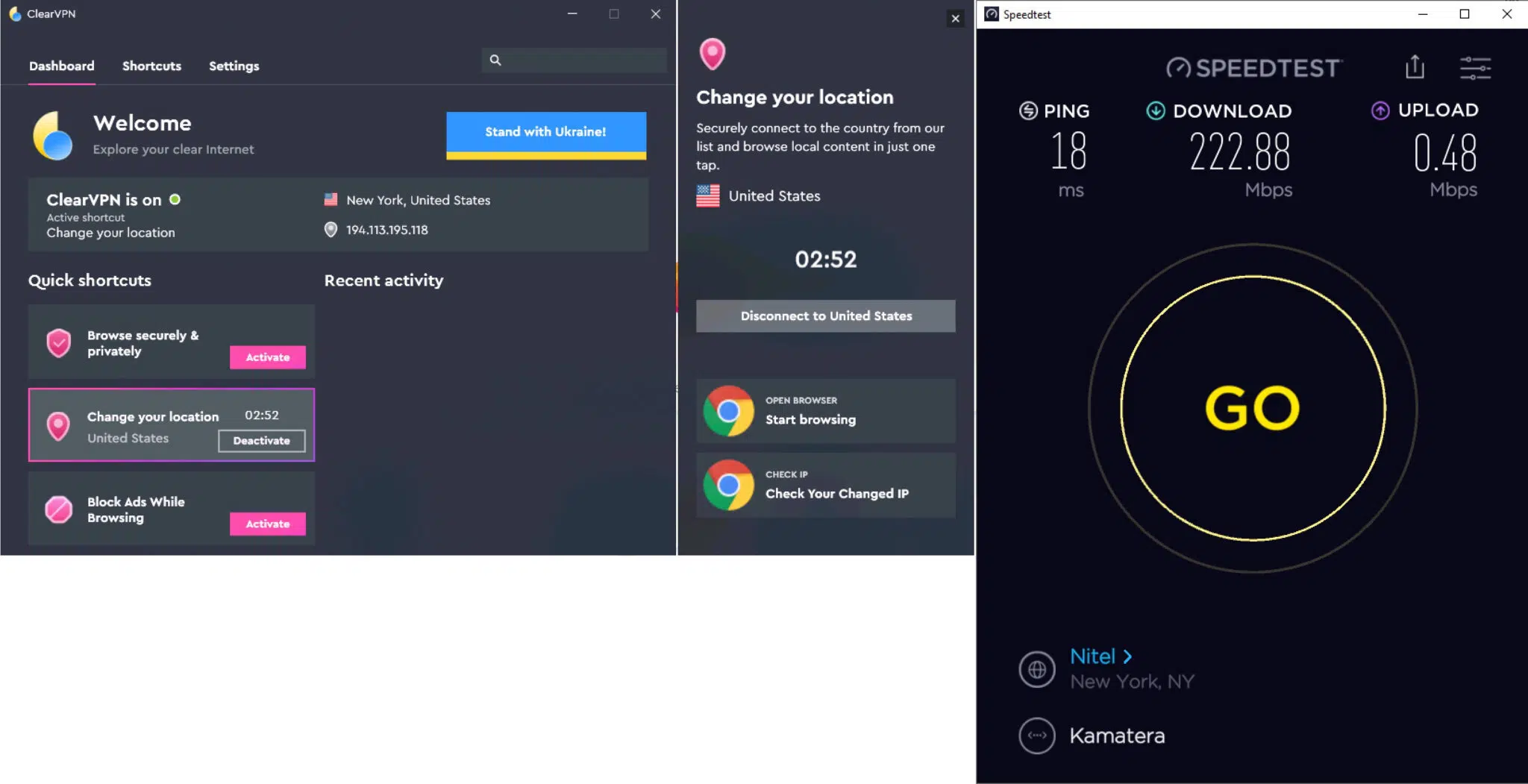
Across all locations and times that I tested, ClearVPN averaged out at 93.6 Mbps download speed – which is quite good. It’s worth noting, however, that the number is high because the speeds were phenomenal when I was connected to a nearby server. But the speeds would drop significantly the further away I got from my actual physical location, as you can see below.
I tested servers located in North America, Europe, and Asia – and the results were quite good. Unless you have a very high bandwidth ISP connection, you likely won’t feel ClearVPN’s effect. Below are the average speeds for servers in each region:
- North America (where I am located): 230 Mbps
- Asia: 16 Mbps
- Europe: 35 Mbps
I couldn’t tell you which protocol I used to conduct my tests because, unfortunately, ClearVPN doesn’t make this information available to the user. That’s because of its “shortcuts philosophy,” in which every interaction with the app is done through shortcuts. And there are no OpenVPN or IPSec shortcuts. While I can manually select the country I want to connect to (not the specific server or city, just the country), the app gives no indication as to what VPN protocol I’m using.
ClearVPN supports OpenVPN, IKEv2, and a custom version of WireGuard. ClearVPN doesn’t support “vanilla” WireGuard. Instead, it supports its own custom protocol “based on WireGuard.” I wish I could tell you more about that protocol, but ClearVPN’s website isn’t very helpful in terms of technical information, and we get no details on this in-house VPN protocol.
I also tested ClearVPN with online gaming, and the results were very good. I connected to a server close to my original location (to get good ping times), and everything worked as expected. I didn’t experience any lag or disconnects. Good stuff.
Supported devices
ClearVPN supports the basics. That is:
- macOS
- Windows
- iOS
- Android
And it also supports Setapp (the iOS/macOS app subscription service), but the Setapp apps are the same iOS and macOS apps you get without the Setapp subscription.
Streaming
On the upside, once you get your head around ClearVPN’s “workflow,” streaming does indeed work quite well. I was able to watch Amazon Prime Video US, Hulu, and BBC iPlayer. And even though ClearVPN expressly claims that it does not work with Netflix, I was able to watch Netflix US just fine. It may just be a temporary blip on Netflix’s part, so I won’t guarantee that it works every time. But in my testing, it did work.
And to be fair, this may be one area where shortcuts actually work pretty well. When you want to stream a particular location’s library, I guess you don’t really care which server you’re connected to.
Does ClearVPN allow torrenting?
Well, ClearVPN doesn’t mention torrenting anywhere on its website. And there’s no “Torrenting” shortcut. But I still tried it, and it worked – very well. The speed tests were quite good, so there was no reason for torrenting to be slow (in regards to the VPN, not the number of seeds/peers). And, as expected, torrenting worked just fine. I experienced no lagging, no disconnects – just smooth P2P downloads.
Does ClearVPN support split tunneling
At this time, ClearVPN does not support split tunneling.
Split tunneling is a popular feature today in the commercial VPN space. Split tunneling allows you to choose, on an app by app basis, which traffic is sent out the VPN gateway and which traffic goes out through your ISP gateway. So you could send your streaming traffic through your regular ISP connection and have the rest go through the VPN. Or you could only send your P2P traffic through the VPN while sending the rest of your traffic through your ISP connection. You can also do anything in-between those two scenarios. Split tunneling is very versatile and can accommodate almost any scenario.
We hope to see ClearVPN support split tunneling in the near future.
Security, privacy, and logging
In assessing a VPN provider’s security and privacy, it’s critical to go beyond the marketing and look at its privacy policy. Most of the time, the devil is in the details.
Looking at ClearVPN’s privacy policy, the first thing we notice is its clarity. You have the actual privacy policy on the left and then a sort of translation in layman’s terms on the right. While the right-hand side may oversimplify things in certain instances, it’s still nice to see a privacy policy that regular folks can read and understand.
The first thing we find is its no-logs policy. All good here.
ClearVPN Pricing
ClearVPN provides four subscription options:
- One month: $5
- Three months: $12 – works out to $4 per month
- Six months: $21
Please Click Here To Get The Offer